
Disclosure: This review is reader-supported. We may earn a commission if you buy through our links.
For Storytelling & Faceless YouTube:
🏆 Choose ElevenLabs.
Best for documentaries and stories. Unmatched emotion.
For Tutorials & Explainers:
🏆 Choose Murf AI.
Best for screen recordings. Sync audio to video instantly.
In 2026, the AI voice battle has narrowed down to two titans: ElevenLabs vs Murf AI.
Both are incredible, but they serve different types of creators. If you choose the wrong one, you might waste hours on editing. This comparison breaks down exactly which one fits your YouTube workflow.
ElevenLabs
“The Creative Genius”- Unbeatable Human Emotion
- Instant Voice Cloning
- Generates Sound Effects too
- Best for: Storytelling, Horror, Docs
Murf AI
- Sync Audio to Video / Slides
- Precise Pronunciation Control
- Canva Integration
- Best for: Tutorials, Demos, Corporate
Round 1: Voice Realism & Emotion
This is the most important factor for creators. How human does it sound?
ElevenLabs: It’s widely considered the “Gold Standard” of realism. Its AI understands context—it whispers when the script is scary, and shouts when it’s angry. It creates pauses, breaths, and intonations that are indistinguishable from a human actor.
Murf AI: With their new Gen-2 models, Murf is very close. The voices are crisp, professional, and extremely stable. However, they are designed to be clean rather than emotional. This is perfect for a corporate presentation where you want clarity, not drama.
Round 2: Which is Best for YouTube?
We tested both tools for video creation. The answer depends on what kind of channel you run.
ElevenLabs (The Storyteller): If you run a Faceless Channel (documentaries, commentary, horror stories), ElevenLabs is your weapon. Its “Speech-to-Speech” feature lets you act out a scene, and the AI mimics your emotion perfectly. This emotional “hook” is what increases audience retention.
Murf AI (The Educator): If you create Software Tutorials or Explainers, Murf is superior. Why? Because it has a built-in video editor. You can upload your screen recording directly into Murf and sync the voiceover to the exact second on a timeline. No need to switch back and forth with Premiere Pro.
- For Viral Stories & Entertainment → Get ElevenLabs
- For How-To Guides & Demos → Get Murf AI
Round 3: The Workflow Difference
This is where the two tools radically diverge. Look at the dashboards:
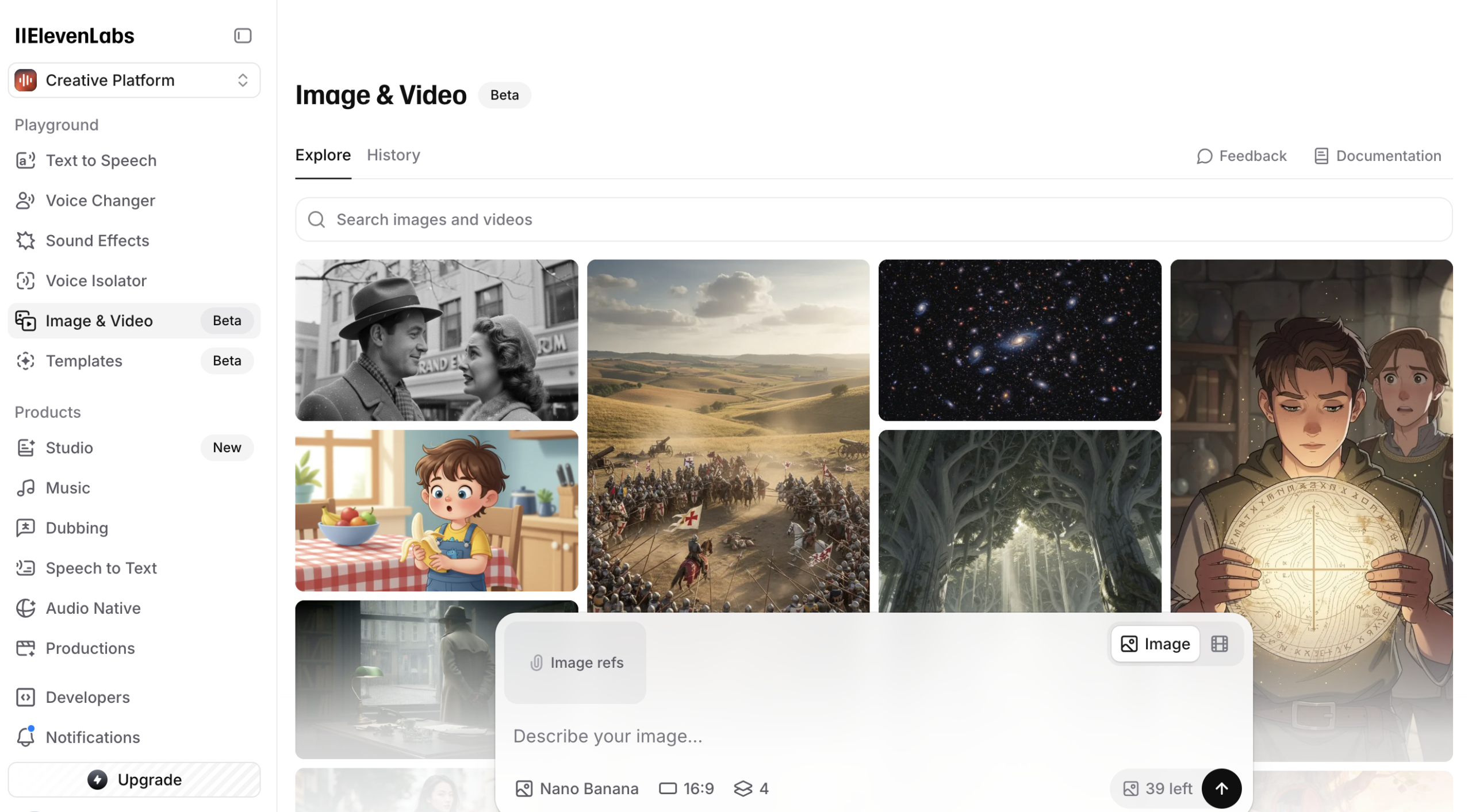 ElevenLabs: Simple “Generate & Download” interface. Fast and focused.
ElevenLabs is built for speed. You type text, choose a voice, and hit generate. It’s perfect if you just need an audio file to drag into your video editor.
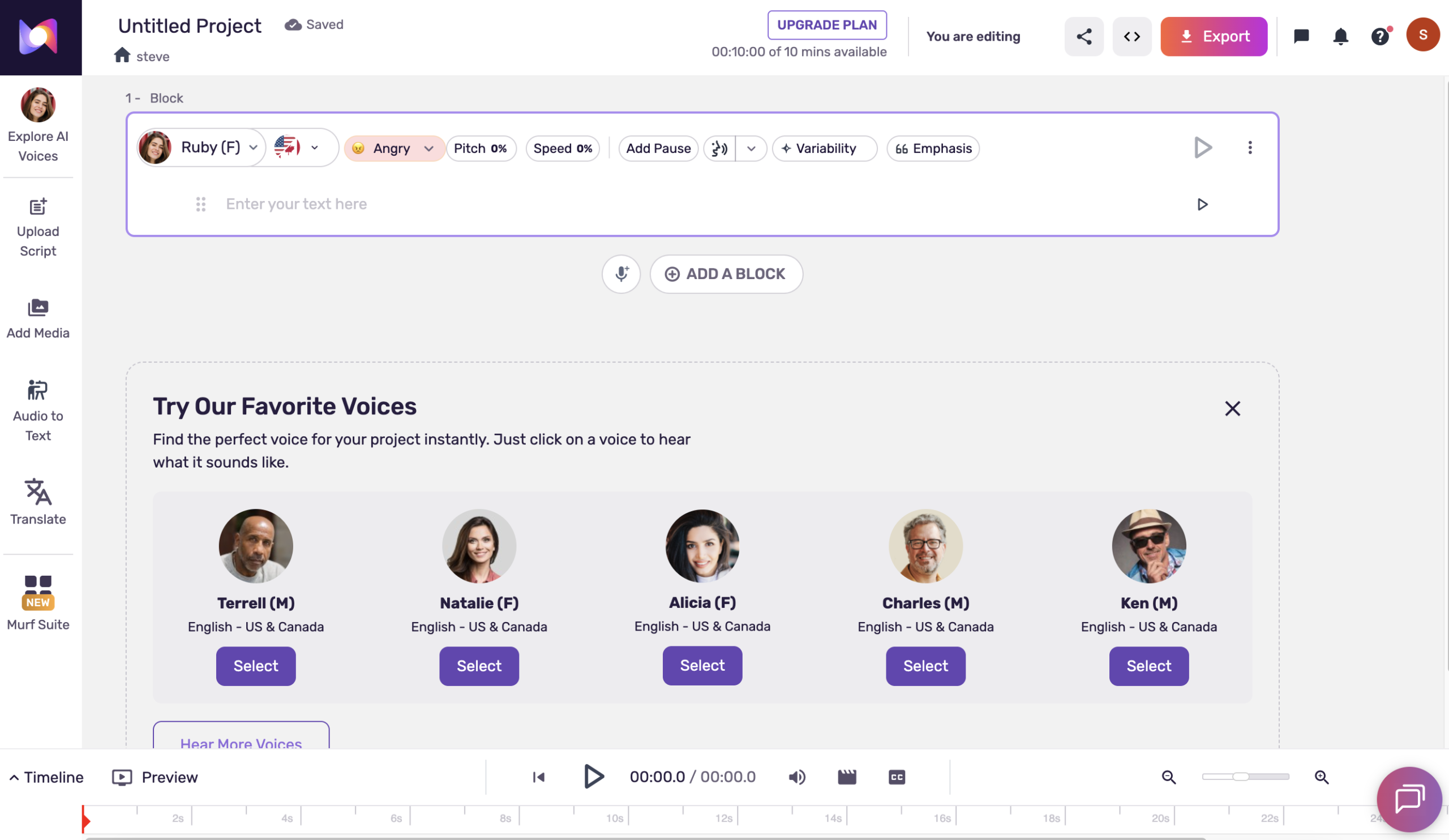 Murf AI: A full timeline editor where you can upload video and sync audio.
Murf AI is a complete studio. Notice the timeline at the bottom? You can upload your video or Google Slides directly into Murf. This saves hours of editing time for instructional designers.
💰 Pricing Showdown
ElevenLabs
Starter Plan
- 30 mins of audio / month
- Instant Voice Cloning (Huge value)
- Commercial License included
- Access to Dubbing Studio
Murf AI
Creator Plan (Yearly)
- Unlimited Downloads
- 24 hours of generation / year
- Canva & Slides Integration
- Over 200+ Voices
Final Verdict: Which is right for you?
Don’t overthink it. Choose based on your content type.
Storytelling Creators
(Docs, Horror, Commentary)
You need the most realistic emotion available.
Get ElevenLabs ($5)Tutorial Creators
(Software Demos, Explainers)
You need video syncing and precise timing.
Get Murf AI