
Meta Description: Confused between AdCreative.ai, Canva, and Looka for your marketing? We compare their AI features, workflow, and output quality in 2025 to help you decide which tool is actually best for creating high-converting ads.
Introduction
In 2025, the phrase “AI design tool” has become dangerously vague.
If you ask a forum “What should I use to make ads?”, you will likely get three very different answers: “Just use Canva,” “Try AdCreative.ai for speed,” or “Start with Looka for branding.”
On the surface, they all seem to do the same thing: use AI to help you create visuals without hiring a designer. But treating them as equals is a massive mistake that can waste your time and budget.
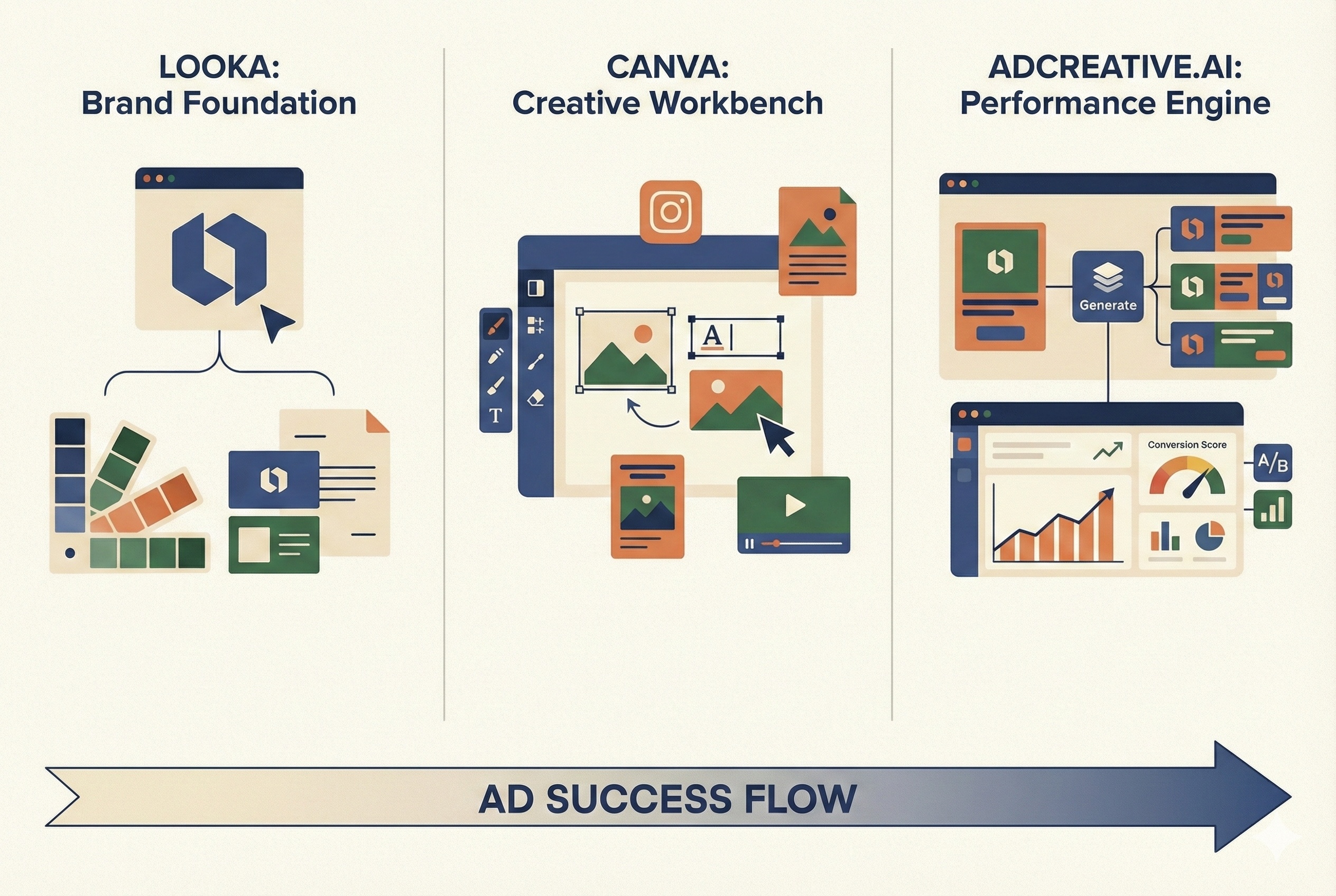
They are not competitors in the traditional sense; they are tools built for entirely different stages of a business lifecycle. One is a generalist workbench, one is a performance engine, and one is a brand foundation Layer.
In this comparison, we are strictly evaluating them on one criteria: Which is best for creating paid advertising creatives that actually convert?
The 30-Second Breakdown: Who Are They For?
Before diving deep, let’s define their core identities in 2025:
- Canva (The Swiss Army Knife): The overwhelming market leader for general graphic design. By 2025, its “Magic Studio” AI is deeply integrated, making it easier than ever to design anything from a social post to a billboard with a mix of AI generation and manual control.
- AdCreative.ai (The Performance Specialist): A niche platform built solely for direct-response advertisers. Its goal isn’t to make “pretty” designs; it’s to mass-produce hundreds of ad variations optimized for click-through rates (CTR) based on data.
- Looka (The Brand Starter): Primarily an AI logo generator. Its main function is to help a new business establish its visual identity from scratch in minutes.
Deep Dive: Canva in 2025
If you need flexibility, Canva is unrivaled.
For Ads: In 2025, Canva’s AI capabilities are formidable. You can use “Magic Switch” to resize an ad for every platform instantly, use generative fill to expand images, and use AI text-to-image for assets.
However, Canva is still fundamentally a “design-first” tool. You start with a template or a blank canvas. You are responsible for the layout, the hierarchy, and deciding what looks good. While AI helps speed up tasks, it doesn’t understand conversion psychology. It won’t tell you, “Move this button here because data says it will get 20% more clicks.”
Pros:
- Total Creative Control: You can tweak every pixel.
- Versatility: Use it for ads, organic posts, presentations, and videos.
- Massive Template Library: Unbeatable variety of styles.
Cons:
- Not Built for Scale: Creating 50 variations of an ad for testing is a manual, time-consuming process.
- No Performance Data: The designs are subjective, not backed by conversion data.
Deep Dive: AdCreative.ai in 2025
If you need speed and data, AdCreative.ai is a weapon.
For Ads: As discussed in our review, AdCreative.ai is not about artistic expression; it’s about math. You feed it your brand assets and copy, and it uses AI trained on millions of successful ads to generate high-converting layouts instantly.
In 2025, its key advantage remains scalability and scoring. It can spit out 200 ad variations in the time it takes to make one in Canva. More importantly, its AI scores predict which ads are most likely to succeed before you spend a dollar on Meta or Google Ads.
Pros:
- Incredible Speed & Scale: Launch massive A/B tests in minutes.
- Data-Driven Decisions: The AI scoring system removes guesswork.
- Conversion Focus: Every element is placed with the intent to drive a click.
Cons:
- Rigid Designs: You are locked into their layouts. You cannot freely move elements around like in Canva.
- Repetitive Aesthetics: Ads can start to look similar after heavy use.
Deep Dive: Looka in 2025
If you don’t even have a logo yet, start here.
For Ads: To be blunt, Looka is not truly an ad creation tool. Looka is fantastic at one specific thing: taking a business name and generating a professional logo and brand color palette in seconds.
Once you have a logo, Looka’s “Brand Kit” offers dozens of automatically generated social media assets (headers, posts, business cards) featuring your new brand. While you can use these for ads, they are usually very simple, generic templates designed for brand consistency, not high-performance marketing. They lack the persuasive layouts required for competitive paid social environments.
Pros:
- Best for Day Zero: The fastest way to get a professional visual identity from scratch.
- Guaranteed Consistency: Ensures your logo, fonts, and colors match across everything.
Cons:
- Not an Ad Tool: Its social assets are too basic for serious paid campaigns.
- Zero Customization: Very limited ability to edit the generated assets.
The Verdict: Which Tool Fits Your 2025 Strategy?
Don’t think of this as “choosing one forever.” You will likely use at least two of these eventually. But for creating ads right now:
Choose AdCreative.ai if:
- You are a performance marketer, dropshipper, or agency. Your main goal is lowering CPA (Cost Per Acquisition) and testing dozens of creatives weekly. You care more about results than pixel-perfect aesthetics.
Choose Canva if:
- You are a social media manager or small business owner. You need one tool for everything—organic posts, stories, emails, and occasional ads. You want your ads to look unique and artistic, and you don’t need to test 100 variations at a time.
Choose Looka if:
- You are launching a brand new business today. You don’t have a logo, colors, or fonts yet. Use Looka to establish your foundation, then graduate to Canva or AdCreative.ai when you are ready to run real ads.
Final Note: In 2025, the smartest workflow is often a hybrid one. Many advanced marketers use Canva to design high-quality individual assets (like a product photo with AI background), and then upload that asset into AdCreative.ai to rapidly generate hundreds of layout variations for testing.